Note For Indian Visitors

Due to the ban on adf.ly in india, Indian users will not be able to view the links directly. To access the links, kindly put https:// before the adf.ly urls OR replace adf.ly with v1.adf.ly to open download links in my site.
Showing posts with label Orkut_Facebook Tricks. Show all posts

Funny Photos For Facebook Commenting

Funny Photos For Facebook Commenting
Hi friends, you might have seen some picture comments on your facebook status updates. These pictures are really very funny and look different from other comments. So, I'm providing you a little collection of these pictures for indian friends. Download them and start making comments with funny pictures.

Stylish Text Generator For Facebook Chat

Stylish Text Generator For Facebook Chat
Hi friends, In my previous posts, I provided you so many facebook chat tricks, and now I'm going to provide you a tool to create stylish facebook chat text. This tool is very easy to use. Just select the text style, type your message and then a preview of your text will appear. If you like it, then just copy the code generated in the box and paste in your facebook chat box. Now your friends will be amazed to see your stylish text. So now, be smart and use this tool to chat with your friends.

Font Styles:
Type Your Message:
Preview:

Copy & Paste below code in your Facebook Chat Box:
Powered By: The Next Generation and Ashutosh Kushwaha.

Note: I have disabled copy paste in my site, so you may be facing problems while copying the code, but don't worry. I've create this as a tool and am providing you as a download. Simply download it from the given link and extract and run the html file. Now, you can copy the code from that tool.

Facebook Adds Stickers, Pusheen and Emoticons in facebook chat

Fecbook Adds Stickers, Pusheen and Emoticons in facebook chat
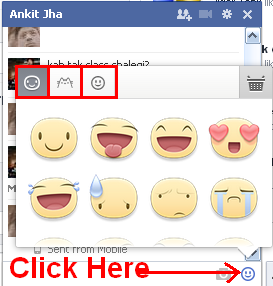
Hey friends, facebook has recently added stickers and pusheens in facebook chat. You can send them to your friends along with your text. These stickers and pusheens make your mesages more stylish. So let's see how to add Stickers, Pusheen and Emoticons in facebook chat:
> Just login to your facebook account and start chatting with your friend.
> While chatting, click smiley face in the bottom right side of the chatbox.
click the smiley icon to see the list of stickers and pusheen
> Now, you will see another box having the stickers and pusheens and smileys.
> Just click on the any of the sticker, pusheen availableand it will be sent to your friend.
Enjoy.

How to insert links in facebook text

How to insert links in facebook text
Hi friends, in html, we can easily create links with texts by using <a href='' /> tag, but facebook doesn't allow users to view the results of html codes in their wall posts or in comments. I have a method using which you can create text links in facebook posts, but you can create links of facebook pages or profiles only, external linking is not allowed. So, let us see how to create links in facebook text:
> Write this code in your status update box,
@[ID:0] @@[0:[ID:1:TEXT]]
> Now replace ID with your profile or page id and TEXT with the text you want to show to your status viewers. You can get your profile or page id from the url of your profile or page, but if you have set any username, then get your id using the tool given below:

Invite All Your Friends In Facebook Group And Page

Invite All Your Friends In Facebook Group And Page
Hi friends, today I'm gonna show you how to invite all friends to like facebook page and how to add all friends in facebook group. For both of these purposes, you need google chrome browser. So, let's start:

Add All Your Friends In Facebook Group:
> First of all, install Facebook Group Invite All extension in your chrome browser. (CLICK HERE TO GET THE EXTENSION)
> Now, after installing the extension successfully, login to your facebook account and go to the group in which you want to add all your friends.
Invite All Your Friends In Facebook Group And Page
> Now click on the blue F icon in the top right side of your browser.
Invite All Your Friends In Facebook Group And Page
> That's it. You will see a box adding all your friends to the group.

Invite All Your Friends To Like A Facebook Page:
> First of all, download the Facebook Page Invite chrome extension. (DOWNLOAD FROM HERE)
> Now open the list of installed extensions by clicking Menu > Tools > Extensions
Invite All Your Friends In Facebook Group And Page
> Just drag the downloaded extension and drop it in the list. It will ask for installation, simply install it.
Invite All Your Friends In Facebook Group And Page
> After installation, you will see the facebook page invite button (tz add) in the top right side of your chrome browser.
> Login to facebook, open your page, click invite friends and scroll down to load all the friends. Then click the tz add button of chrome extension to select all your friends and then click invite.

How To Send Facebook Message To Anyone Using Other's Name

How To Send Facebook Message To Anyone Using Other's Name
Hi friends, in my previous posts, I told you some ways to send fake mails to any user. Now, I am going to tell you a way to send facebook messages to any friend using any other's name. In this way, you can do pranks with your friends and make them shocked. (Warning : Don't misuse this trick). To be able to use this trick, you must have the email id (in the form of username@facebook.com) of the users which are being involved in these spoofed messages. So, let's start:
> Just visit Hack w0rm E-mail Spoofer site. (Click Here To Visit)
> Now a form will appear, just fill the details.
> After filling the details, just click SUBMIT button.
> That's it. You're done.

Latest Facebook Smiley Codes 2013

Latest Facebook Smiley Codes 2013
Hi friends, in my previous posts, I have provided so many smiley codes for facebook, now here are some latest smiley codes for year 2013. Just copy the codes and paste in the chat box of your friend in facebook.

Latest Facebook Smiley Codes 2013
[[329135820464185]] – angel
[[329135840464183]] – angry
[[329135853797515]] – bad
[[329135873797513]] – beer
[[329135897130844]] – bowl
[[329135923797508]] – boy
[[329135930464174]] – brb
[[329135960464171]] – cake
[[329135987130835]] – camera
[[329136013797499]] – car
[[329136037130830]] – cat
[[329136063797494]] – cigarette
[[329136083797492]] – clock
[[329136127130821]] – coffee
[[329136157130818]] – coins
[[329136210464146]] – computer
[[329136230464144]] – confused
[[329136240464143]] – console
[[329136250464142]] – crying
[[329136277130806]] – devil
[[329136300464137]] – dog
[[329136323797468]] – don't know
[[329136337130800]] – drink
[[329136357130798]] – embarrassed
[[329136390464128]] – eyeroll
[[329136413797459]] – film
[[329136433797457]] – fingers crossed
[[329136443797456]] – foot in mouth
[[329136463797454]] – girl
[[329136487130785]] – glasses cool
[[329136510464116]] – glasses nerdy
[[329136533797447]] – good
[[329136563797444]] – handcuffs
[[329136593797441]] – high five
[[329136610464106]] – hug left 
[[329136627130771]] – hug right
[[329136633797437]] – island
[[329136640464103]] – kiss
[[329136647130769]] – lamp
[[329136663797434]] – laugh
[[329136680464099]] – love
[[329136690464098]] - love over
[[329136700464097]] – mail
[[329136747130759]] – moon
[[329136783797422]] - musical note
[[329136790464088]] – neutral
[[329136817130752]] – party
[[329136847130749]] – phone
[[329136873797413]] – pizza
[[329136893797411]] – plate
[[329136917130742]] – present
Check out these codes also (as shown in the image below):
Latest Facebook Smiley Codes 2013
Hope you liked the codes, keep visiting for more tricks.

How To Remove Last Name From Facebook

How To Remove Last Name From Facebook
In so many facebook groups, I saw the people asking for the trick to remove their last name from their facebook profiles, so I am sharing this trick for them who want to remove their last name from facebook. Follow the steps below:

> First of all download and install Firefox browser.
> Now Open Firefox > Options > Advanced > Network > Settings > Connection Settings, and choose manual proxy configuration.
> Now in the HTTP Proxy fields enter proxy as 202.70.136.142 and port as 8080
> Now click the check box of "Use this proxy server for all protocols".
> Now do the settings same as shown in the image below:
How To Remove Last Name From Facebook
> Now, login to your facebook account and delete your middle and last names.
Enjoy

Enabling 2 Step Login Verification And Secure Your Facebook Profile

secure your facebook account
Hi friends, In my previous posts, I told you how to enable 2 step login verfication for GMAIL and YAHOO. Now, FACEBOOK is also providing this feature to make your account more safe and secure. So, if you want to apply this feature with your account, follow the steps below:


> Login to your facebook account and go to Account Settings > Security > Login Approvals.
> Is will be disabled by default, so click over it and it will ask you to confirm your mobile number to use this feature.
enable 2 step login verification for facebook
> Now facebook will send a verification code at your mobile. Just enter the code in the box and click NEXT.
NOTE: If you are using your browser in incognito mode, private browsing or frequently cleaning cookies, then you will not be able to set this feature. You may see this notification:
enable 2 step login verification for facebook
But, if you do not do anything as mentioned by facebook reasons, then you may apply this feature.
> Now, after enabling the 2 step login verification for facebook, sign out of your account close the browser and clear all the cookies and cache of the browser. You can use CCLEANER app to perform the cleanup.
> Open your browser and login to facebook, facebook will ask for the mobile security code.
enable 2 step login verification for facebook
Instantly, you will get your password on your mobile. Then you can enter the code there and login to your facebook account.
> In this way, you can make your facebook profile more secure.
Enjoy.

Download Videos From Youtube, Facebook, Metacafe and Other Sites Easily

Hello friends, these days, so many internet users are facing problems in downloading videos from youtube because most of the internet users use Internet Download Manager to download videos from youtube and these days, youtube videos are not being downloaded by IDM. But I am going to tell you about a great software which can download videos from Nico Video, YouTube, Google Video, MetaCafe, HowCast, Break, Facebook, ViveLeak, Veoh, Vevo, Vimeo etc. Using this software is very easy and it can convert all types of videos in any format. Not only this, you can edit your videos also using this software. The biggest plus point of it is that it's totally free of cost. I know, you might be guessing which software it may be, so I am going to clear your query, It's "ANY VIDEO CONVERTER".
Let's see how it downloads videos from Youtube. Follow the steps:
> Download Any Video Converter From Here and install it in your pc.
> Go to youtube and open your video.
> Now copy the video url from the address bar of your internet browser.
> Now, open ANY VIDEO CONVERTER.
> Click "ADD URLs" Button.
download videos from different sites easily
> A new window appears, just paste the video url and click "Add to download list". (You can add as many video urls as you want. I am adding only a single url to create this tutorial)
download videos from different sites easily
> Now, the video link will be added in Any Video Converter's Download list.
> Now, right click on the added video and click "DOWNLOAD SELECTED ONLINE FLV".
download videos from different sites easily
> Now, any video converter will start downloading your video.
download videos from different sites easily
> When download will be completed, you can get the video by right clicking on the downloaded video thumbnail and by clicking "OPEN SOURCE FILE LOCATION".
download videos from different sites easily
> Now, if you want you can convert your downloaded video in any format using Any Video Converter.
> Enjoy Downloading Videos.

Get Rs. 50 Talktime From Facebook

Hi friends, if you are a regular reader of my blog, then you might have enjoyed so many free recharge tricks. Now, this time facebook has come up with a promotional offer providing free Rs.50 recharge to all the mobile users who sign up for their free account with new mobile number that’s has been never used on facebook yet. Yes that’s right its just a user expanding program from facebook that’s going to give out some cash back in form of talktime for users that are new the online social world and would like to connect with facebook.

How to Avail this Free Recharge Offer by Facebook

free talktime by facebook
You just need to have a brand new mobile number that you haven't used on facebook yet, so that we can use that number to create a new account and after validating it you will get your recharge for free.
  1. Visit This Link [Free Talktime Offer Page by Facebook]
  2. Now enter your new mobile number and your alternate number, you can also add your friends number as referred one.
  3. Make sure that the number you enter is new and genuine as you will get a verification message on it, now press Next and enter some more basic details that will create your free account on facebook.
  4. Now when your account is created and validated just wait for 3 days to get your free Rs.50 recharge. Till then you can enjoy sharing some thoughts with your friends on Facebook.
NOTE: It will take 3 days for getting Rs.50 sent in your account, if you by chance or some problem do not receive your amount than you can send them mail at talktime@fb.com with your mobile number and other details you filled out.

Listen Music On Facebook While Chatting


Listen Music On Facebook
Facebook gives you a lot of features to socialize with your friends and family. It gives you latest news and updates about them, and also lets you interact with them and connect with them on a whole new level. It is said that music is one of the most powerful ways to connect with others. Be that as it may, music is also the most fun way to connect with your buddies. People enjoy music in real life when they are alone, but not as much as they enjoy it when they're with their friends. Since Facebook is all about sharing real life events, what if you could share your music-listening experiences with others as well? And we're not talking about posting YouTube links on your wall here.

What if you could listen to music with others over your chat? Well now, Facebook allows you to do just that! Now, you can listen to a song with your friends at the exact same time, so you could all feel the energy simultaneously!

How to add music to Facebook?

Facebook has been working with third party app providers to integrate music on Facebook. Since Facebook doesn't have its own music service (which it should have), you will have to use a third party app. For this purpose, some major music apps have emerged, such as Spotify, Slacker, Pandora, iLike, and more. You can search for these apps and install just like you would install any other like Farmville.
Once installed, you'll see a separate tab for music in your left sidebar, listing all the music applications you have installed. Once you go over to that tab, you'll get a whole new dashboard depending upon the apps you chose.This will allow you to listen to music as you browse through Facebook. You can search for music, or listen to trending albums. Additionally, you can see what is popular with your friends.

To start off, go over to your music dashboard, or search for third party apps listed above. It's a simple process.
Listen Music On Facebook

How to listen to music with your friends?

According to a blog post by Spotify, once u install the app, "You'll start seeing new music posts and play buttons all over your news feeds. Hit a play button and the music starts. Right there. Spotify fires up to give you a new soundtrack to your social life. Check out your new Music Dashboard and your real-time ticker to discover the music that's trending with your friends.'
You can start listening to songs by clicking on the  icon next to music links. Such links will appear in your news feed, or in your ticker letting you know when someone is listening to music. If your friend is presently listening to a song, you will see a  icon next to their name in chat, or in the ticker. Clicking it will open up a chat with your friend and start the song right there! Cool huh? Going to your music dashboard, you'll see which of your friends listened to a song, and by which service. When you click on the music icons, you'll be prompted to install that service's app if you haven't already done so.

Some popular music services

Spotify is the most popular service around here. It has over 22.5 million monthly active users. But unfortunately, Spotify is not available for every country. They are working on expanding their influence, but as yet, they are still mostly limited to the U.S and some other countries in Europe.

Rdio is another popular music service. It was built for social interactions, and hence, it integrates well with Facebook. You can sign up for it just by connecting your Facebook account. But again, it is not available for every country :(

Along with these, there are two more popular service that have recently surfaced. Slackerand Deezer.

Some problems with music services

Since this is a very popular and traffic-lucrative idea, a lot of scams have also begun to surface. For example, in my research for this article, I came across multiple apps that required me to turn off secure browsing. Now agreeing to that would be voluntarily handing over your information.

Secondly, most of these apps are not available for every country. So people who don't have access to this feature feel really left out. These apps would really benefit if they extended their reaches.

Despite the problems and security concerns, this really is a great feature. And Facebook is trying constantly to improve it. You can still listen to music and share it with your friends. Just head over to your music dashboard and start rocking :)

Source: MyBloggerTricks

Facebook Chat Text Generator

Hi friends, I have provided so many facebook chat tricks in my previous posts, and you can read them under Facebook_Orkut Tricks section of my blog. Now, I am going to share one more trick to generate Chat Text as images. See the screenshot below:
chat code
Just visit the website i am giving you the link and then type the message there. Then it will generate a code, copy that and paste in chat bar.
Enjoy.

Facebook Ghost Profile Prank

Facebook Ghost Profile
Hi friends, I am sharing a funny facebook prank which can scare your friends. Yes, just visit this profile and wait for a minute. You will see a screaming ghost after some time, when you open the profile. Click the below link to visit the ghost profile. If you want to make your friends scared, just send them this link and tell them to open and see it for one minutes. Don't forget to turn on your speakers and make the sound loud.
Enjoy.

RockMelt Browser: Integrated With Social Networking Sites

RockMelt Browser is another amazing social network integrated browser delivering you with fast, innovative and customizable experience. The best part about this browser is that its has all the main networks and is totally customizable on how you interact with all of them. Its supports Facebook, Twitter, YouTube, Gmail and all the New stats + you get an awesome lightning fast browsing speeds.
Well as said on their website Its Not a browser.
Its A WOWser.
RockMelt Browser
Updating Status, Reading Messages and Checking Notifications on Facebook with RockMelt Browser :
So now updating status, reading messages and checking notifications is lot easier on Facebook with this awesome Browser. As you can see in the above image all those Facebook icons are just embed on the left hand top side of the browser status bar.

Reading News Channels with RockMelt Browser :

Now reading news is also a fun and way more practical because you will get it delivered on what ever page you are currently browsing because its embed just on the left hand side of your browser.

Chatting through RockMelt Browser :

Now you can also chat with all your friends using this browser because on the right hand side you have the chat widget which shows all your friends online and you can directly chat with them.

Download RockMelt Browser for Windows :

You can Download RockMelt Browser for Windows machine for free right from their website, its simply an awesome browser with amazing social experience and lightning fast speeds.

Download Facebook Photos In Single Click

I have already posted how to download your Facebook Albums in .zip package and with that earlier method you were able to download your friends images too just using that online service, but if you need an alternate way to download your images right from your desktop than, I am sharing a software called PhotoGrabber.
download facebook photos

How to use PhotoGrabber Desktop Application :

1. Download PhotoGrabber Desktop client for Windows or Mac.
2. Now just sign in with your Facebook Account and then you have to allow this application to access your Facebook data.
3. Now you will see all the albums listed in this application. Just choose which ones you wanna download and then hit Begin Download.
4. Now downloading will start and you will get all your albums right on one folder on your desktop.

How To Create Custom Facebook Chat Smileys

Facebook Chat Smileys
Hi friends, I have posted so many tricks of facebook chat and in that series, I am sharing a trick to create your own facebook chat smiley using any picture. Yes, you can use any picture (size must be small) as facebook chat symbol using this trick.
So, let's start with the process:
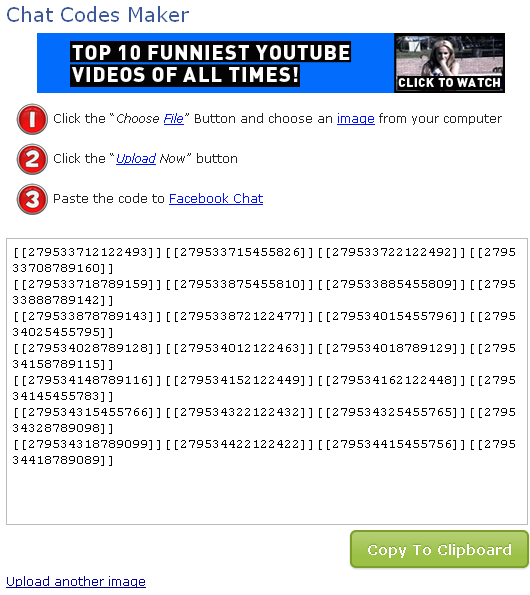
1. Visit THIS SITE (click here) to use chat code maker.
2. Now click Choose File and select your photo which you want to use in facebook chat. Now fill the captcha and click Upload Now.
Create Custom Facebook Chat Smileys
3. Upload process will start now.
Create Custom Facebook Chat Smileys
4. After successful uploading of image, you will get your code.
Create Custom Facebook Chat Smileys
5. Now copy your code and paste in facebook chat box. You will see your picture as smiley. I have made my favorite singer KK's photo as a smiley. See the image below.
Create Custom Facebook Chat Smileys
Enjoy...!!

How To Write Colorful Alphabets In Facebook Chat

How To Write Colorful Alphabets In Facebook Chat
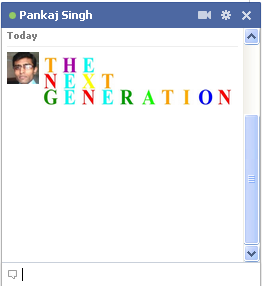
Hi friends, I have provided so many facebook chat tricks in my previous posts. Now I am sharing one more trick to write colorful text in facebook chat. The codes for all the alphabets are given below.
[[244961858909298]] = A
[[344113652270150]] = B
[[344991278847613]] = C
[[164461493653696]] = D
[[196752423751220]] = E
[[301630573215430]] = F
[[251496118250464]] = G
[[266394220086654]] = H
[[164866556948132]] = I
[[180599335371968]] = J
[[209067005843651]] = K
[[238594039545396]] = L
[[147702285338528]] = M
[[309221402452022]] = N
[[180901405340714]] = O
[[246506925416551]] = P
[[333343613344059]] = Q
[[123128367803569]] = R
[[316143388416019]] = S
[[334073456605673]] = T
[[199626093460643]] = U
[[224202614323263]] = V
[[336032459740792]] = W
[[205228226232732]] = X
[[142420399202282]] = Y
[[157919817645224]] = Z

For example, if you want to write THE NEXT GENERATION in the chat box, copy the alphabet codes followed by a space between each alphabet. The code is:

[[334073456605673]] [[266394220086654]] [[196752423751220]]
[[309221402452022]] [[196752423751220]] [[205228226232732]] [[334073456605673]]
[[251496118250464]] [[196752423751220]] [[309221402452022]] [[196752423751220]] [[123128367803569]]  [[244961858909298]] [[334073456605673]] [[164866556948132]] [[180901405340714]] [[309221402452022]]

Animated Facebook Smileys

Once again, here is an amazing trick for facebook smileys. Just use the codes below and see the magic in your chat box.

Animated Facebook Smileys

Animated Facebook Smileys

Animated Facebook Smileys

Animated Facebook Smileys

Animated Facebook Smileys

Animated Facebook Smileys

Animated Facebook Smileys

Animated Facebook Smileys

Animated Facebook Smileys

Animated Facebook Smileys

Animated Facebook Smileys

Animated Facebook Smileys

Animated Facebook Smileys

Animated Facebook Smileys


[[126278187384134]] – O YEah Hippo
[[126217194056900]] – i ♥ u
[[126540207361797]] – Smileys
[[398699314236]] – Teddy n ♥
[[110780922298250]] – Heart on Fire
[[127878643893717]] – Clapping Of Hands
[[398570519236]] – Sleeping Mickey
[[394930959230]] – Smileys Zzzz
[[126398717372810]] – Converse Shoe
[[126229327389020]] – Red Rose
[[127868980561350]] – Heart beat
[[126220920723194]] – Santa
[[126216480723638]] – Blue Butterfly
[[126132024065417]] – Rotating Heart
[[126236287388324]] – Love Code
[[126125527399400]] – Muaaach Kissing :*
[[126134560731830]] – Hoam Ngantuk Rek
[[126261164052503]] – Hula Hula
[[126221767389776]] – Spin Heart
[[126214010723885]] – Stroke
[[126386227373330]] – Oversleep Insomnia
[[389448181885]]    – Week
[[126539730695178]] – Love Shame
[[126540207361797]] – Love Smail
[[126232017388751]] – Broken heart
[[126229700722316]] – Pikachu
[[126392380706048]] – ready sleep
[[126276450717641]] – blast love ..tiupan cinta
[[126391564039463]] – Stress
[[110566632320002]] – Cat listening to music
[[126230590722227]] – Super Mario


Enjoy facebooking...!!

Download Our Android App

download our android app

Online Reputation

ashutoshthehacker.com Webutation

Site Protected..!! Don't Copy

Contact Form

Name

Email *

Message *